
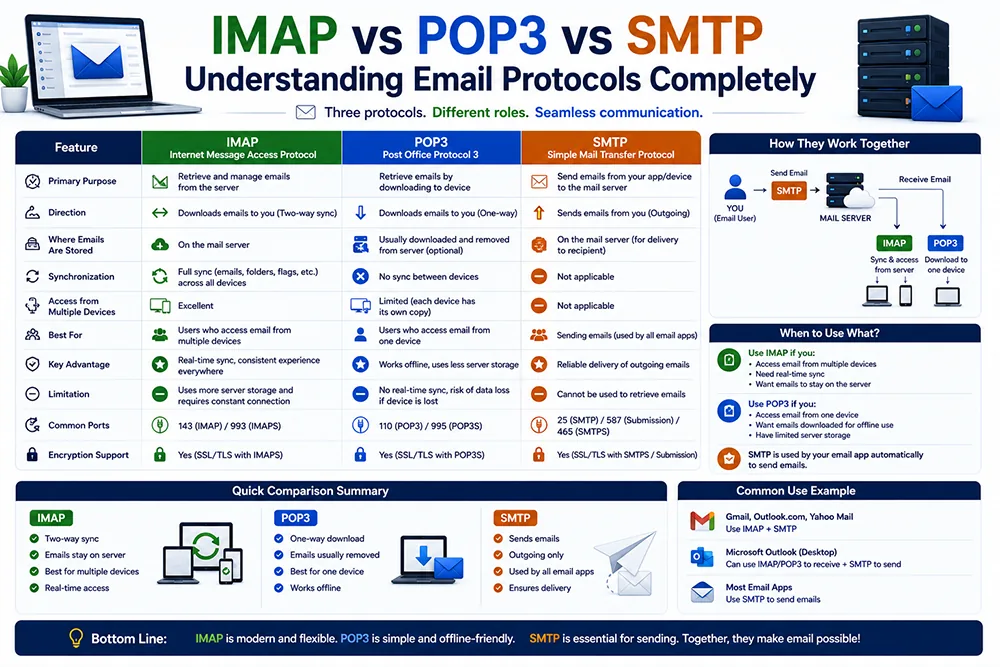
What Role Does Each Protocol Play in Email?
Every email system relies on three protocols working together. SMTP (Simple Mail Transfer Protocol) handles outgoing mail - it sends your email from your device to the recipient's mail server. POP3 and IMAP both handle incoming mail - they retrieve emails from the server to your device. The key difference is how they handle storage: POP3 downloads and removes from the server, IMAP keeps emails on the server and syncs. Webomatic configures all three protocols correctly for every client email setup.
What is SMTP and How Does it Work?
SMTP (Simple Mail Transfer Protocol) is the protocol that handles sending emails. When you click Send in Outlook, SMTP authenticates with your outgoing mail server (typically on port 587 or 465) and delivers your email to the recipient's server. SMTP is used for outgoing mail only - you always need either IMAP or POP3 alongside SMTP for a complete email setup. Without correct SMTP settings, your emails will fail to send or land in spam. Webomatic configures SMTP with proper authentication for all client accounts.
- SMTP uses port 25 (server to server), port 587 (client with STARTTLS), or port 465 (client with SSL).
- Always use port 587 with STARTTLS or port 465 with SSL for client-side SMTP - never port 25.
- SMTP requires authentication - your email address and password must be correct for emails to send.
- Wrong SMTP settings result in sending errors, bounced emails, or messages landing in spam folders.
- Webomatic provides correct SMTP settings and tests outgoing email during every client email configuration.
A Side-by-Side Comparison of IMAP and POP3
IMAP keeps emails on the server and syncs across all devices - ideal for professionals using a phone and laptop. POP3 downloads emails to one device and removes them from the server - ideal for single-device users who want local storage. IMAP uses more server storage. POP3 uses more local device storage. IMAP allows server-side search and folder management. POP3 is simpler and works well offline. Most modern businesses choose IMAP. Webomatic recommends IMAP as the default for all new client email setups.
- IMAP: emails stored on server, synced across all devices, uses more server mailbox storage space.
- POP3: emails downloaded to device, removed from server, uses minimal server storage, no sync.
- IMAP port is 993 (SSL) - POP3 port is 995 (SSL) - SMTP outgoing port is 587 or 465.
- IMAP is better for teams, multiple-device users, and anyone who needs email accessible from anywhere.
- POP3 is better for single-device users, offline environments, or when server storage is very limited.
Which Protocol Should Your Business Use in 2025?
In 2025, IMAP is the clear choice for any business that uses more than one device - which is virtually everyone. The convenience of synced email across your phone, laptop, and desktop far outweighs the minor additional server storage usage. POP3 is still useful in specific edge cases - very limited hosting storage or single offline-access device scenarios. SMTP is always needed for sending. Webomatic configures IMAP plus SMTP for all new client email accounts as the standard modern email setup.
- Any business using a smartphone and a laptop should use IMAP - not POP3 - for their email setup.
- IMAP plus SMTP is the standard combination for a complete, modern business email configuration.
- POP3 remains relevant only when server storage is extremely limited or single-device access is mandatory.
- Google Workspace (Gmail with your domain) uses IMAP exclusively - no POP3 by default.
- Webomatic sets up IMAP plus SMTP as the default for all new client domain email accounts in India.
Understanding email protocols helps you make informed decisions about how your business email is set up and managed. Whether you need IMAP for multi-device sync or POP3 for offline access - Webomatic configures the right setup for you. We provide email configuration support for businesses across Ahmedabad, Vadodara, Surat, Rajkot, and all of India. Contact us at webomatic.in or call +91 99249 43005.