
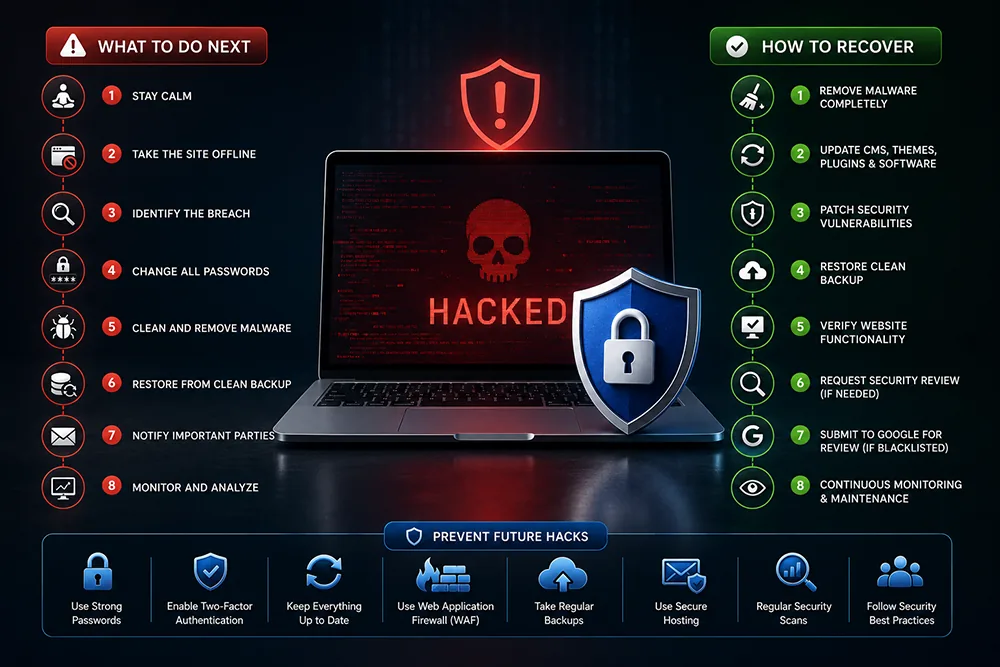
Step 1 - Take Your Website Offline Immediately
The moment you confirm your website has been hacked, take it offline. A hacked website can serve malware to your visitors, redirect them to phishing sites, or collect their data without their knowledge. Every minute your hacked site stays online causes more damage - to your visitors, your SEO rankings, and your reputation. Contact your hosting provider and ask them to temporarily suspend the website. Webomatic provides emergency response support for hacked client websites and helps take quick containment action.
Step 2 - Restore From a Clean Backup
If you have a recent clean backup - taken before the hack occurred - restoring from it is the fastest and safest recovery method. Go to your cPanel backup section or ask your hosting provider to restore the most recent pre-hack backup. After restoration, you still need to change all passwords and patch the vulnerability that allowed the hack - otherwise the attacker can simply return. Webomatic maintains backup schedules for all managed client websites precisely for situations like this.
- Restore from the most recent backup taken before the hack - not after, as that backup may also be infected.
- Verify the restored website is clean before bringing it back online - do not rush this step.
- If no backup exists, a manual malware scan and file cleanup will be needed - far slower and riskier.
- After restoration, immediately patch whatever vulnerability was exploited to prevent re-infection.
- Webomatic restores hacked client websites from backup and verifies clean operation before going live again.
Step 3 - Scan for Malware and Remove All Infected Files
If no clean backup is available, a manual malware scan is required. Use server-level tools like Imunify360, ClamAV, or Wordfence (for WordPress) to scan all website files and identify infected ones. Common signs of infection include: unfamiliar PHP files in public directories, modified core files, injected JavaScript at the top or bottom of PHP files, and spam links hidden in your pages. Remove all infected files carefully. Webomatic performs manual malware cleanups for hacked websites and documents every change made during the recovery process.
- Imunify360 is a server-level malware scanner available on most cPanel hosting - run it immediately after a hack.
- Check recently modified files - sort files by date modified to spot files changed around the time of the hack.
- Hackers often create backdoor files disguised as legitimate PHP files - look for unfamiliar files in root folders.
- Injected spam links in your pages harm your SEO and can trigger a Google manual penalty against your site.
- Webomatic provides manual malware cleanup services for hacked websites across Gujarat and India.
Step 4 - Change All Passwords and Harden Security After Recovery
After cleaning or restoring your website, change every password immediately - cPanel, FTP, database, CMS admin, email accounts, and domain registrar. The hacker may have obtained all credentials during the breach. Update all CMS software, plugins, and themes to their latest versions. Remove unused plugins and themes. Set file permissions correctly (644 for files, 755 for directories). Submit your cleaned website to Google for recrawl in Search Console. Webomatic handles post-recovery security hardening for all client websites after a hack incident.
- Change cPanel, FTP, database, CMS admin, and email passwords immediately after confirming the site is clean.
- Update your CMS, all plugins, and themes right away - the hack likely exploited an outdated component.
- Request Google recrawl in Search Console after cleanup so the "hacked site" warning is removed promptly.
- Set up automated daily backups immediately if you did not have them - do not wait for a second incident.
- Webomatic performs post-hack security hardening and monitoring for clients across Ahmedabad and India.
A website hack is stressful - but with the right steps taken quickly, full recovery is absolutely possible. The most important thing is not to panic and to act systematically. Webomatic provides emergency hack recovery and post-incident security services for businesses across Ahmedabad, Vadodara, Surat, Rajkot, and all of India. Contact us at webomatic.in or call +91 99249 43005 for emergency support.