
What is POP3 in Email?
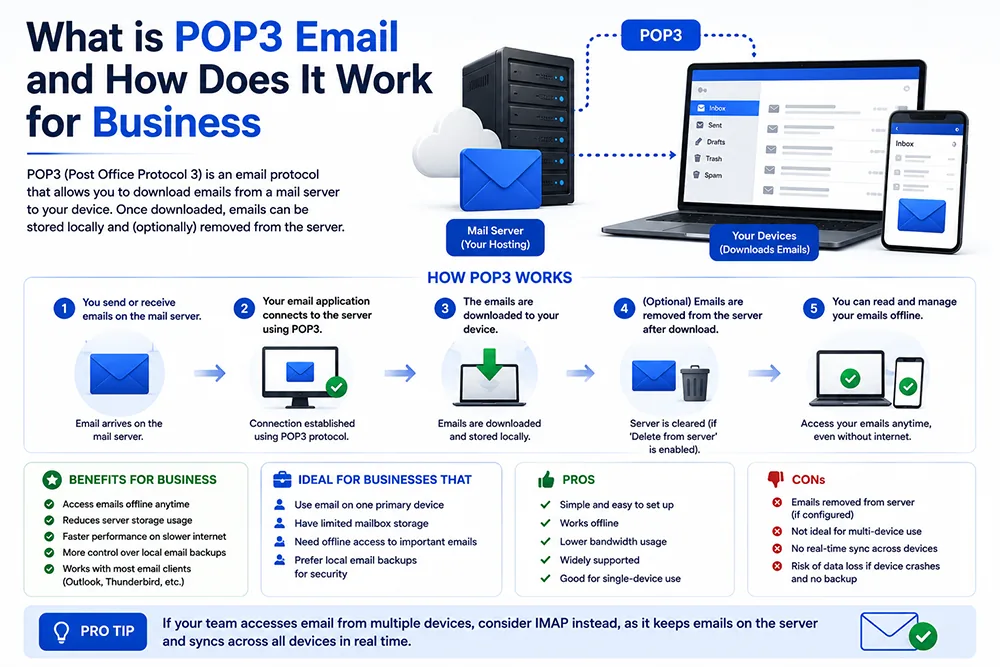
POP3 stands for Post Office Protocol version 3. It is one of the two primary protocols used to receive emails from a mail server onto your device. When you configure your email client (Outlook, Thunderbird, or phone) with POP3 settings, it connects to the server, downloads all new emails to your local device, and - by default - deletes them from the server. Webomatic configures email protocols for clients based on their specific workflow needs and device usage patterns.
How Does POP3 Work Step by Step?
When you click "Send/Receive" in Outlook with POP3 configured, it connects to your mail server on port 110 (or 995 for SSL), authenticates with your email and password, downloads all new emails to your local inbox, and disconnects. The emails now exist only on your device - not on the server (unless you set it to keep a copy). This makes POP3 ideal for users who check email from a single device and want their emails stored locally for offline access.
- POP3 uses port 110 for unencrypted connections and port 995 for SSL-encrypted secure connections.
- By default, POP3 deletes emails from the server after downloading - freeing up your server storage space.
- You can configure POP3 to keep a copy on the server for a set number of days before deletion.
- POP3 allows offline access to downloaded emails - useful in areas with intermittent internet connectivity.
- Webomatic provides correct POP3 server settings during email configuration for all client accounts.
What are the Advantages of Using POP3?
POP3 has specific advantages that make it useful in certain scenarios. Since emails are downloaded and stored locally, you can access them offline without internet. It frees up server storage - important for hosting plans with limited mailbox space. It is simple to configure and works reliably with all email clients. For businesses with a single primary email user accessing from one dedicated computer - POP3 is a straightforward and efficient choice. Webomatic recommends POP3 where storage constraints or offline access are primary concerns.
- POP3 stores emails locally - allowing full offline access even when internet connectivity is unavailable.
- Since emails are removed from the server, POP3 keeps server mailbox storage usage minimal.
- POP3 is simpler to configure than IMAP - fewer settings and synchronisation options to manage.
- For a business with one user on one device checking email - POP3 is perfectly efficient and reliable.
- POP3 emails stored locally are not at risk if your hosting server is hacked or goes down.
What are the Limitations of POP3 Compared to IMAP?
The biggest limitation of POP3 is that emails exist on only one device - if you check email on your laptop with POP3, your phone will not show those emails because they have been downloaded and deleted from the server. There is no synchronisation across devices. Sent mails, drafts, and folders are also not synced across devices with POP3. For modern businesses accessing email on multiple devices - phone, laptop, tablet - IMAP is almost always the better choice. Webomatic helps clients choose the right protocol based on how they actually use their email.
- POP3 does not sync email across devices - emails downloaded on one device disappear from others.
- Sent items, drafts, and custom folders are not synchronised across devices with a POP3 setup.
- If your device is lost or crashes, locally stored POP3 emails may be permanently lost with it.
- POP3 is not suitable for teams - multiple people cannot share a POP3 inbox without conflict.
- Most modern businesses with smartphones and laptops are better served by IMAP than POP3.
POP3 is a reliable and simple email protocol that works well in specific scenarios - single-device access, limited server storage, or offline email needs. For most modern businesses using multiple devices, IMAP is a better fit. Webomatic configures the right email protocol for every client based on their actual workflow - not just what is easiest to set up. Contact us at webomatic.in or call +91 99249 43005 for all email setup needs across Ahmedabad, Gujarat, and India.